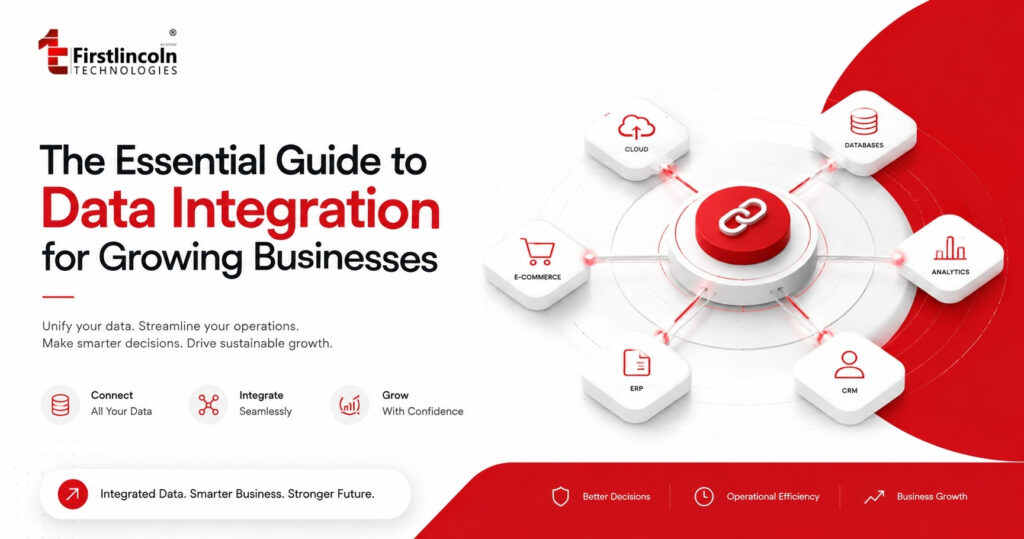
The Essential Guide to Data Integration for Growing Businesses
Lekan Ayorinde
August 19, 2026
Imagine it is Monday morning and your leadership team is preparing for its weekly performance meeting. For a growing business, this is where data integration problems often become visible: the numbers needed for one decision are spread across multiple business systems. Sales reports ₦48 million in revenue for the previous week. Finance reports ₦42 million because it is working from cleared payments rather than booked sales. The CRM shows 1,200 new leads, while Operations is working with a different customer count. Inventory figures do not match what the e-commerce platform is showing.
Before leadership can discuss growth, profitability or customer experience, someone has to spend hours pulling information from the CRM, accounting software, payment platforms, e-commerce system and several spreadsheets to create a version of the numbers everyone can agree on. The business does not necessarily have a data shortage. It has a data connection problem. As companies grow, information becomes distributed across more applications, databases, departments and external platforms. Customer information may live in a CRM. Payments may sit in a financial platform. Orders may be stored in an e-commerce system. Inventory may be managed somewhere else, while management reporting depends on spreadsheets that employees update manually. Each system may work perfectly well on its own. The problem begins when the business needs information from several of them at the same time.
Data integration is the process of connecting data from different sources and systems so that information can be combined, synchronized, transformed and made available for business use. The objective is not simply to move information from one place to another. It is to make information more accessible, consistent and useful across the organization. IBM, in a January 2024 article on data ingestion and integration, emphasizes that true integration isn’t just about connecting systems — it’s about ensuring data quality and governance so information remains reliable across the business.IBM — The Importance of Data Ingestion and Integration for Enterprise AI For a growing business, this distinction matters. Adding another software tool may solve one operational problem while creating another if that new system becomes another isolated source of information. The real value comes when the systems supporting the business can work together, creating a connected data environment where operational information can move between applications and support reporting, analytics and day-to-day decisions.
What Is Data Integration?
At its simplest, data integration means connecting information from different applications, databases or platforms so that it can be accessed and used together. In practice, business data integration can involve APIs, ETL and ELT pipelines, middleware, webhooks, database replication and other methods for synchronizing or consolidating information. Consider a growing company that uses a CRM for customer and sales information, accounting software for invoices and payments, an e-commerce platform for online orders, an inventory system for stock and spreadsheets for management reporting. Without integration, each system develops its own version of the business. Sales may know that a customer placed an order. Finance may know whether the customer has paid. Operations may know whether the product is available. Customer Support may know whether the customer previously complained about a delivery. But unless those systems are connected, employees have to manually bring the information together. With integration, relevant information can move between systems according to defined rules.
A completed order can update inventory. A successful payment can update the order status. Customer information can be synchronized with the CRM. An invoice can be generated in the accounting system. The transaction can then become available to a reporting or business intelligence environment. The important idea is not that every system must contain every piece of information. It is that the right information should be available to the right system at the right time. Microsoft, in its explanation of data integration, describes the practice as combining data from disparate sources to create a unified view, while highlighting benefits such as improved accessibility and reduced duplication.Microsoft — What Is Data Integration? This is why data integration is more than a technical exercise. It is an operating capability that connects business applications, improves access to information and creates a stronger foundation for reporting, analytics and automation.
Why Does Data Integration Matter for Growing Businesses?
Growth creates complexity. A business might begin with a website, an accounting application and a few spreadsheets. As customers increase, the company adds more tools to manage sales, marketing, payments, customer service, inventory, logistics and reporting.
The pattern often looks like this: More customers → More transactions → More systems → More data → More complexity The problem is not necessarily that any individual system is wrong. The problem is that the organization gradually creates a network of systems that were never designed to communicate with one another. That is when employees begin becoming the integration layer.
Someone exports customer records from one application and uploads them into another. Another employee downloads payment transactions into Excel. Finance reconciles those transactions against bank records. Operations updates inventory manually. Management waits for someone to combine everything into a report. At a certain point, the business is no longer simply using technology. It is maintaining a manual process around technology. Oracle, in its April 2024 overview of data integration, emphasizes that valuable information often lives across spreadsheets, legacy applications, cloud platforms, and third-party systems. Bringing these sources together, Oracle notes, is essential for more holistic and reliable business decision-making.Oracle — What Is Data Integration? Examples & Use Cases
For a growing business, the practical lesson is straightforward: Technology creates more value when the systems underneath the business can work together. A well-planned data integration strategy can help connect CRM, finance, e-commerce, inventory and other core business systems without requiring every application to become a single system.
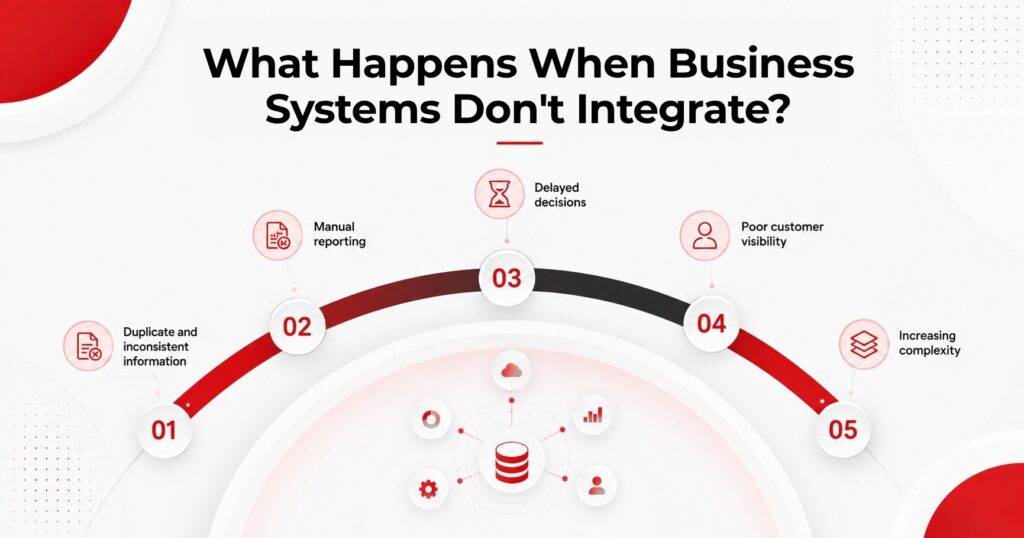
What Happens When Business Systems Don’t Integrate?
Disconnected systems rarely announce themselves as a major technology problem. Instead, the symptoms appear as small operational frustrations. These are common signs of poor business data integration and often become more costly as the organization grows. A salesperson asks Finance why a customer’s payment is not reflected. Finance asks Operations why an order is marked as delivered when the invoice remains outstanding. Customer Support cannot see the latest order status. Marketing has one customer count while Sales has another. Management asks why the dashboard does not match the spreadsheet used during the previous meeting. Each individual issue may appear manageable. Together, they indicate that information is moving through the business inefficiently.
1. Duplicate and inconsistent information
When multiple systems contain overlapping information without reliable synchronization, duplicate customer records, product records or transactions can emerge. A customer might appear under slightly different names in the CRM and accounting system. A product may have one stock figure in the e-commerce platform and another in the warehouse system. The result is not simply messy data. It becomes difficult to determine which information should be trusted.
2. Manual reporting
Disconnected systems also create a hidden operational cost: the time employees spend preparing information for decision-making. Instead of analyzing what happened, analysts may spend hours collecting files, cleaning columns, removing duplicates, reconciling records and formatting spreadsheets. When this becomes a recurring process, the business should ask whether the underlying systems could be connected more effectively.
3. Delayed decisions
When information takes days to assemble, decisions are made using older information. Leadership may want to know which products are selling fastest, which customers are generating the most revenue or whether inventory is approaching a critical level. If answering those questions requires manually combining information from several systems, decision-making becomes dependent on the speed of reconciliation.
4. Poor customer visibility
Customer experience can suffer as well. A customer may have purchased several times, contacted Support about a previous order and recently made another payment. If those interactions exist in separate systems that employees cannot easily connect, the customer may have to repeatedly explain their situation. The problem is not necessarily that the business lacks customer data. It is that the business lacks a connected view of the customer.
5. Increasing complexity
Finally, disconnected systems become harder to manage as the company grows. Every new platform introduces another potential data source, another format and another possible reconciliation point. Poor integration therefore has a tendency to become more expensive over time.
How Does Data Integration Work?
A practical way to understand data integration is to think of it as a flow from business data sources to useful business outcomes:
Data Sources → Integration Layer → Data Processing → Destination → Business Use
The process begins with the systems that generate or store information. These may include CRM platforms, ERP systems, accounting applications, e-commerce platforms, payment systems, databases, websites, mobile applications, spreadsheets, logistics platforms and external APIs. The integration layer provides the mechanism through which information moves between those systems. Depending on the architecture, this could involve APIs, connectors, middleware, webhooks, data pipelines or replication technologies. The data may then need to be transformed. One system may store a customer’s name as separate first-name and last-name fields while another stores the full name in a single field. One platform may use a particular date format while another uses a different format. Product identifiers may also differ between systems. Transformation and validation help ensure that information can be interpreted consistently by the receiving system. Oracle’s documentation on data flows explains that integration flows can move information between source and target data assets while applying operations such as cleansing, aggregation and transformation before the data is used downstream. The final destination depends on the business objective. Data might be sent into another operational application, a data warehouse, a business intelligence platform, a dashboard or an automated workflow. This is why the goal of integration should not simply be:
“Move the data.”
The better question is:
“What business process or decision should this connected data improve?”
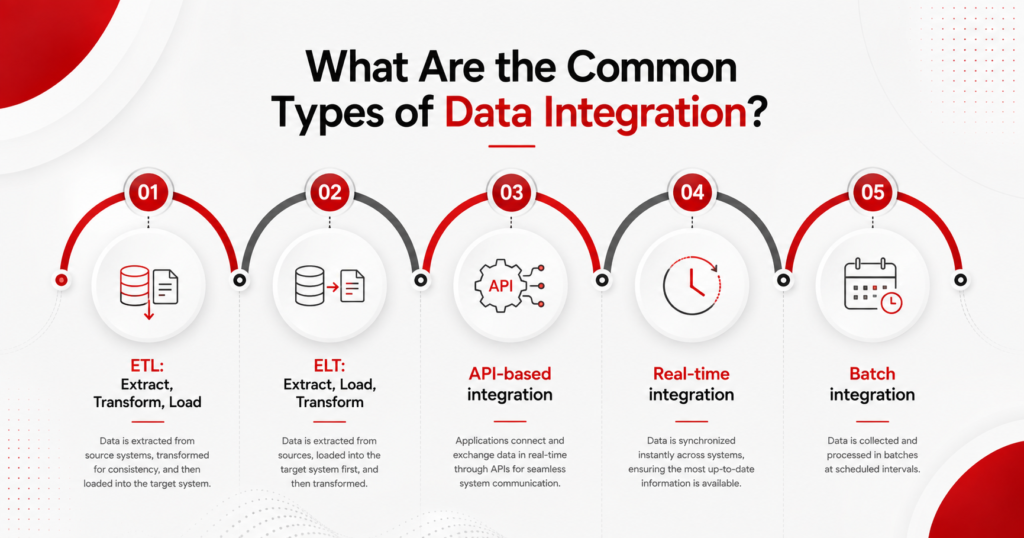
What Are the Common Types of Data Integration?
There is no single data integration approach that works for every business. The appropriate method depends on factors such as data volume, how quickly information needs to move, the systems involved, security requirements, technical architecture and the intended business use.
1. ETL: Extract, Transform, Load
ETL stands for Extract, Transform and Load. Data is extracted from one or more sources, transformed according to defined rules and then loaded into a destination such as a data warehouse. For example, a company may collect sales information from several business systems, standardize product codes, remove duplicate records and load the cleaned information into a reporting environment.
2. ELT: Extract, Load, Transform
ELT reverses the order. Data is extracted and loaded into the target environment first, with transformations taking place afterward. This approach is particularly relevant to modern cloud data platforms that provide significant computing capacity for processing large datasets. AWS, in its overview of ETL, emphasizes that both ETL and ELT approaches are viable, with modern cloud infrastructure making it increasingly practical to load data into a target environment before transformation — especially for high-volume analytical workloads. For a business leader, however, the important question is not which acronym sounds more modern. It is whether the architecture fits the organization’s data volume, reporting requirements and technology environment.
3. API-based integration
APIs, or Application Programming Interfaces, allow software applications to exchange information according to defined rules. For example, an e-commerce platform may communicate with a payment provider to confirm whether a transaction was successful. A CRM may communicate with another system to update customer information.
4. Real-time integration
Real-time integration is useful when a delay in information can affect the business process. Consider inventory. If a product sells through an online store, the business may need the inventory system and other sales channels to receive that change quickly. Not every process requires this level of speed. A daily financial report, for example, may not need to update every few seconds.
5. Batch integration
Batch integration moves information at scheduled intervals. A business might transfer data every hour, every night or at the end of a reporting period. This can be appropriate when information does not need to be available immediately. The broader lesson is simple: Integration architecture should follow the business requirement, rather than the other way around.
What Are the Benefits of Data Integration?
The value of data integration ultimately depends on what it changes inside the business. A successful integration strategy should connect technical improvements to measurable operational or business outcomes. When systems are properly connected, employees can spend less time transferring and reconciling information, managers can gain a more complete view of operations, and reporting can become easier to maintain. The practical benefits include:
Less manual work: Repetitive transfers between systems can be automated, reducing unnecessary administrative effort.
Better visibility: Connected information gives teams a clearer view of customers, transactions, inventory and operations.
More consistent reporting: Properly mapped and governed data provides a stronger basis for management reporting.
Faster operations: Information can move through processes such as order management, billing and customer support more efficiently.
Stronger analytics: Integrated information creates a better foundation for business intelligence, forecasting and more advanced analytical initiatives.
Integration does not automatically make data accurate. It creates the infrastructure through which organizations can manage, validate and use that data more effectively.
Does Your Business Need Data Integration?
The signs are usually operational rather than technical. Your business may need to examine its data integration environment if employees regularly combine information from several spreadsheets or systems before producing reports, or if different departments maintain separate versions of customer, sales, or inventory information. Staff may find themselves repeatedly copying data from one application into another, while management meetings often involve disagreements about which number is correct. Customer support might struggle to access order, payment, and interaction history in one place. Finance may spend significant time reconciling transactions across platforms. Inventory figures can differ between the warehouse and sales channels, and adding another software tool often creates yet another isolated source of information. Leadership may find it difficult to obtain a current view of important business metrics, while employees spend more time preparing data than interpreting what it means. If several of these situations sound familiar, the business may not need more software. It may need a better way for its existing systems to work together.
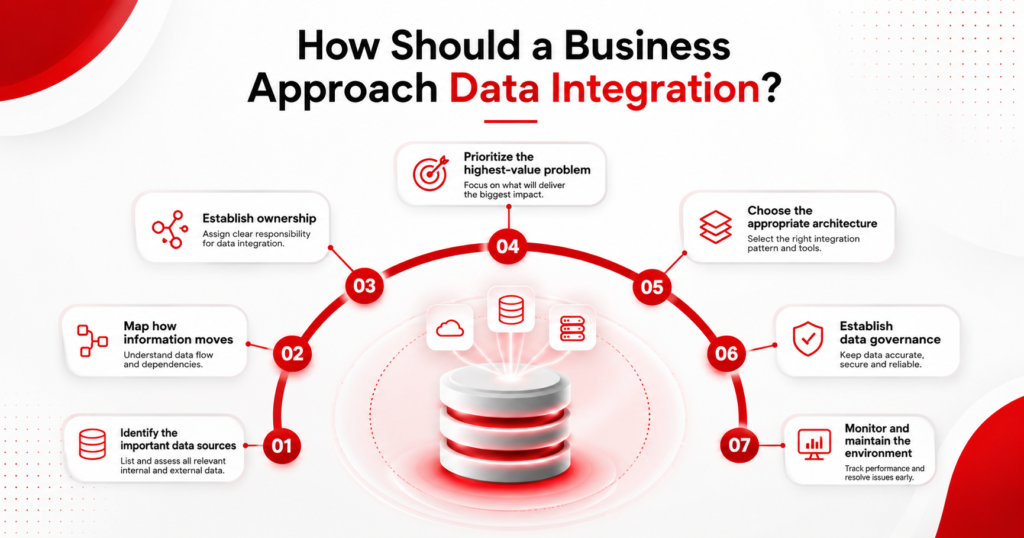
How Should a Business Approach Data Integration?
A common mistake is to treat data integration as a technology project before understanding the business problem. A better approach starts with the information, the business process and the outcome the organization wants to improve.
1. Identify the important data sources
Document the applications, databases, spreadsheets and external platforms that hold information critical to business operations.
2. Map how information moves
Understand where information originates, where it goes, who uses it and where manual intervention currently occurs.
3. Establish ownership
Determine which system is responsible for particular information and what should happen when different systems contain conflicting records.
4. Prioritize the highest-value problem
Do not attempt to connect everything at once. Start with the process where integration could remove the greatest amount of friction. That might be order-to-cash, inventory synchronization, customer information, financial reconciliation or executive reporting.
5. Choose the appropriate architecture
Once the problem is clear, determine whether the solution requires APIs, ETL, ELT, real-time synchronization, batch processing, replication or a combination of approaches.
6. Establish data governance
Integration should be accompanied by clear rules around data ownership, quality, access, security and change management. In its February 20, 2025 guidance on data governance, Microsoft Learn emphasizes the importance of making organizational data discoverable, accurate, trusted and protected throughout its lifecycle. Microsoft Learn — Data Governance with Microsoft Purview For a growing organization, governance becomes increasingly important because more systems begin depending on shared information.
7. Monitor and maintain the environment
Integration is not necessarily a one-time project. Applications change. APIs change. Data structures change. Businesses introduce new tools and processes. A reliable integration environment therefore requires monitoring, error handling and ongoing maintenance.
Data Integration vs. Data Migration vs. Data Consolidation
These terms are often used interchangeably, but they describe different data management activities. Understanding the difference helps businesses choose the right approach for a particular technology or reporting problem.
Dimension
Data Integration
Data Migration
Data Consolidation
Primary purpose
Connect systems and enable data exchange
Move data from one system to another
Bring data from multiple sources into a centralized environment
Typical frequency
Ongoing, scheduled or real-time
Usually one-time or phased
Ongoing or project-based
Typical trigger
Need for interoperability
System replacement or modernization
Need for centralized analysis or reporting
Main focus
Connectivity and synchronization
Transfer and transition
Centralization
Example
Connecting CRM, finance and e-commerce systems
Moving historical records from an old CRM to a new CRM
Bringing CRM, finance and sales data into a data warehouse
Imagine a company replacing an old accounting platform with a new cloud-based system. Moving historical financial records from the old platform into the new one is data migration. Connecting the new accounting system to the CRM, payment platform and reporting environment so information continues to move between them is data integration. Bringing selected information from those systems into a central data warehouse for analysis is data consolidation. A business may therefore use all three.
What Should Businesses Consider Before Integrating Their Systems?
Connecting systems without planning can create a faster way to distribute bad information. Before implementing a data integration solution, businesses should evaluate data quality, security, scalability, compatibility and the expected return on the investment. 1. Data quality should therefore be considered before implementation. If customer records contain duplicates or product identifiers are inconsistent, integration may simply spread those problems across more systems. 2. Security is equally important. Data moving between applications may include customer information, financial records or other sensitive business information. The architecture needs appropriate authentication, access controls, encryption and monitoring based on the sensitivity of the data. 3. Scalability also matters. An integration that works for 5,000 transactions may not perform the same way when the business reaches 500,000. 4. Compatibility is another consideration. Some applications provide mature APIs and webhooks, while others depend on older interfaces, file transfers or custom integrations. Finally, businesses should consider total cost of ownership. Integration costs may include development, infrastructure, monitoring, maintenance, licensing, security and support. But the most important consideration is business alignment. 5. A good integration project should always be connected to a measurable outcome. If the objective is to reduce payment reconciliation time, then the improvement should be tracked and quantified. If the goal is to improve inventory accuracy, the business should measure whether discrepancies decrease after integration. And if the aim is to reduce the time required to produce management reports, that reduction should be visible in practice. 6. Technology should make the business process better.
A Practical Example: Data Integration in a Growing Nigerian Business
Consider a fictional Nigerian retail and distribution company called Lagos Goods Co. The company has grown from a small online retailer into a multi-channel business. It now operates an e-commerce website, physical retail locations, payment platforms, an inventory system, accounting software and a logistics partner. The business has plenty of information. The challenge is that the information lives in different places. Before integration, an online order may be recorded on the website while payment confirmation sits with the payment provider. Inventory may be updated separately by Operations. Finance may later reconcile transactions against bank settlements, while Customer Support relies on another system to track complaints and delivery information. When something goes wrong, employees have to investigate across several platforms. Suppose a customer pays for the last available unit of a product online. If the e-commerce platform does not communicate with the inventory system quickly enough, another customer could purchase the same product through a physical store. Now the business has an operational problem that originated from a data connection problem. With a properly designed integration, the order event can trigger a sequence of connected actions. Payment status can be confirmed. Inventory can be updated. The order can enter fulfillment. Customer information can be updated in the CRM. Relevant financial information can become available to the accounting system. Management dashboards can receive the transaction data required for reporting. The exact architecture will vary depending on the systems involved. But the business outcome is the same: Information moves with the process instead of employees manually moving information between systems. That distinction becomes increasingly important as transaction volume grows.
Data Integration and the Future of Business Analytics
Good business analytics depends on having timely access to the information required to answer a business question. Data integration provides an important foundation by connecting the operational systems that generate the information analysts and decision-makers need. If customer information exists in one system, sales information in another and transaction data somewhere else, analysts may spend significant time preparing the information before analysis can even begin. Integration helps create the connected data environment required for more reliable reporting and analysis. In its December 16, 2025 discussion of data integration tools, IBM explains that modern integration environments can support approaches such as ETL, ELT and data replication, with the appropriate approach depending on factors such as data freshness, security and analytical requirements.IBM — Data Integration Tools: Types, Functions and Benefits This creates a useful progression: Disconnected data → Integrated data → Better reporting → Better analytics → Better decisions Advanced analytics and AI can come later. The first requirement is still the same: the organization needs reliable access to the information those systems depend on.
Final Takeaway: Data Integration Is About Making Information Work Together
Data integration is often described as a technical process, but its business impact is much broader. It affects how easily information moves through an organization, how quickly employees can access what they need, how much time teams spend reconciling systems and how confidently management can interpret its reports. As businesses grow, their data environment naturally becomes more complex. New customers create more transactions. More transactions create more systems. More systems create more opportunities for information to become fragmented. The answer is not necessarily to replace every system or purchase another platform. Sometimes the better solution is to make the systems the business already relies on work together. At FirstLincoln Technologies, we approach technology from the business problem backward. The goal is not data integration for its own sake. It is to create a connected technology environment that helps organizations access reliable information, reduce unnecessary manual work, improve business reporting and make better decisions as they grow. If your team spends too much time reconciling reports, transferring information between applications, correcting duplicate records or trying to determine which system contains the most reliable version of a number, your business may have an integration problem. The question is not whether your business has enough data. It is whether your systems allow that data to work together. If you are ready to assess your current data environment, identify critical data integration gaps and build a more connected technology foundation, FirstLincoln Technologies can help you evaluate your systems, identify practical integration opportunities and design a path forward that aligns technology with your business goals. Explore FirstLincoln Technologies
To provide the best experiences, we use technologies like cookies to store and/or access device information.
Consenting to these technologies will allow us to process data such as browsing behavior or unique IDs on this site.
Not consenting or withdrawing consent, may adversely affect certain features and functions.
Functional
Always active
The technical storage or access is strictly necessary for the legitimate purpose of enabling the use of a specific service explicitly requested by the subscriber or user, or for the sole purpose of carrying out the transmission of a communication over an electronic communications network.
Preferences
The technical storage or access is necessary for the legitimate purpose of storing preferences that are not requested by the subscriber or user.
Statistics
The technical storage or access that is used exclusively for statistical purposes.The technical storage or access that is used exclusively for anonymous statistical purposes. Without a subpoena, voluntary compliance on the part of your Internet Service Provider, or additional records from a third party, information stored or retrieved for this purpose alone cannot usually be used to identify you.
Marketing
The technical storage or access is required to create user profiles to send advertising, or to track the user on a website or across several websites for similar marketing purposes.